Review draftDotted gold underline marks draft copy for your own words.
Our flagship is now on Google Play
Intelligent apps,built for what’s next.
Agentic Applications engineers ambitious software for a connected world, where every signal finds its route. Our flagship, NxtGenTv Elite, is on Google Play now, and the next wave is already in development.
01sourceXtream, M3U URL, M3U file, or Stalker portal
02epgXMLTV for M3U/Stalker
03guideEliteCast timeline guide: channels down the side, programs across a shared time axis, now-line
04recordDVR-style recording to internal storage or an authorized USB drive or SD card
05viewEliteView split-screen live TV, panel count matched to your device
06remoteD-pad navigation, visible focus, TV launcher entry with banner artwork
07devicesPhone and Android TV
08contentNone included. You bring a source you are authorized to use.
09
01Products
Built for the big screen. And the small one.
Introducing NxtGenTv Elite: The ambitious flagship release from Agentic Applications. As our very first product, it is engineered from the ground up to redefine the media landscape—bringing intelligent, autonomous tech to the core of your viewing experience.
Flagship · Available now
TV & Box
Live TV player
Bring your own playlist. Watch it beautifully.
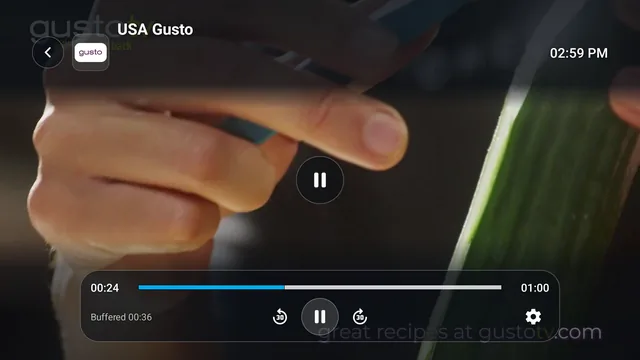
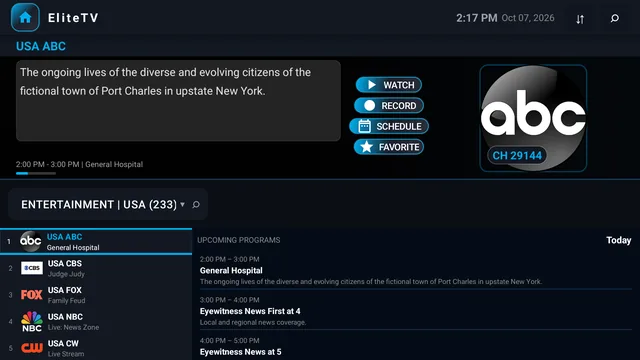
NxtGenTv Elite turns your Android TV or TV box into a live TV powerhouse. Browse channels on see-through glass menus while the picture keeps playing full screen, record live TV with one press, let EliteScheduler record a whole series for you, and download films and episodes to watch offline.
One app for TV, box and phone. Bought on Google Play, it works on every device signed in to your Google account. Website purchases, coming soon, cover up to 5 devices.
Content-neutral by design. NxtGenTv Elite does not include, host or provide any channels, streams or content. You bring a source you are authorized to use.
Press left and a see-through channel list slides in while your channel keeps playing full screen: categories, channels with what is on now, and what is coming up next. Press right for that channel's schedule, on glass too. Hold OK for a glass quick menu with the guide, recording, captions, audio, multiview and a sleep timer.
Recording Manager · TV
02
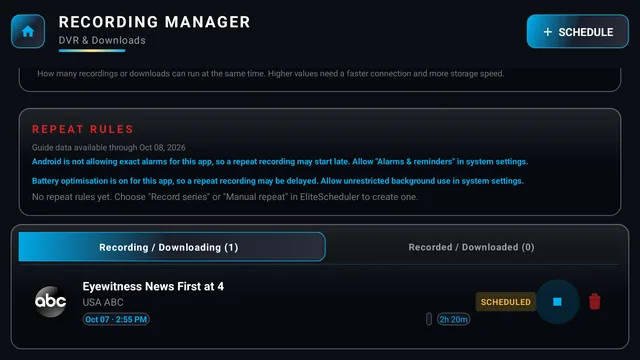
Record live TV with one press
Hit record and NxtGenTv Elite captures the channel, reconnects by itself if your provider drops the stream, and keeps writing one continuous recording. Watch from the start while it is still recording, run several recordings and downloads at once, save to a USB drive or SD card, and protect the ones you want to keep.
EliteScheduler · TV
03
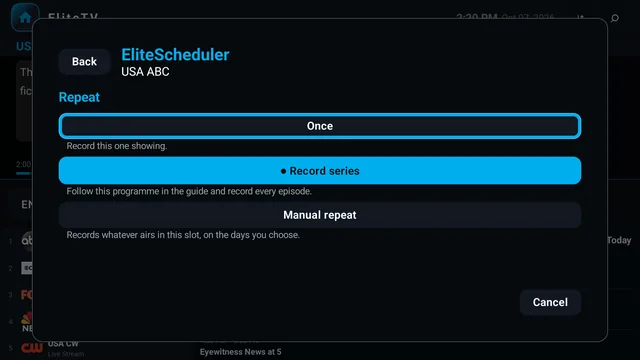
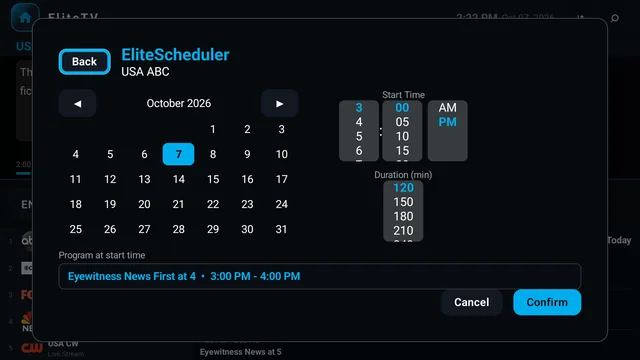
EliteScheduler records it for you
Pick a show from the schedule and EliteScheduler takes it from there: record it once, record the whole series by name, or record the same time slot every week. Keep only the newest episodes if you like, add extra time at the end, and the recording starts on time even with the screen off.
04
Download for offline
Save films and episodes to your device and watch them any time, even with no connection to your provider.
Film and series libraries · TV
05
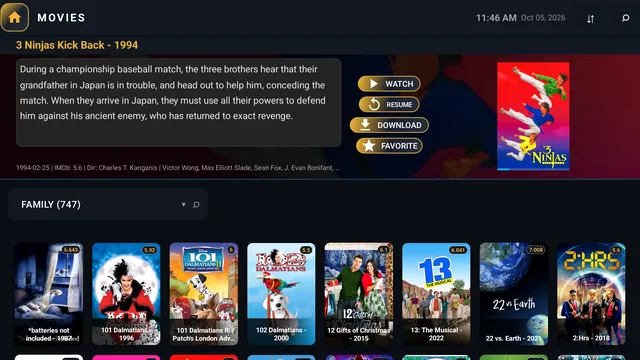
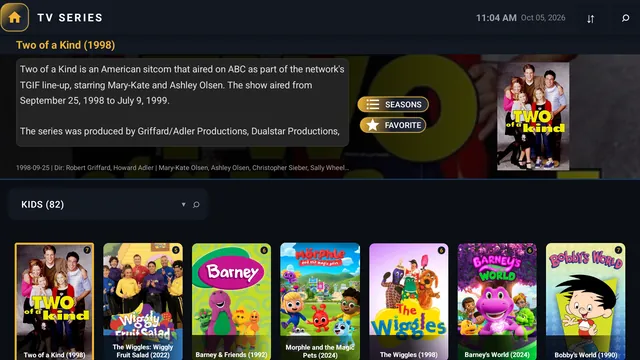
Films and series, poster-rich
Big artwork, the details you need above a row of posters, and the next episode lined up to play on its own when you are binge-watching.
EliteCast guide · TV
06
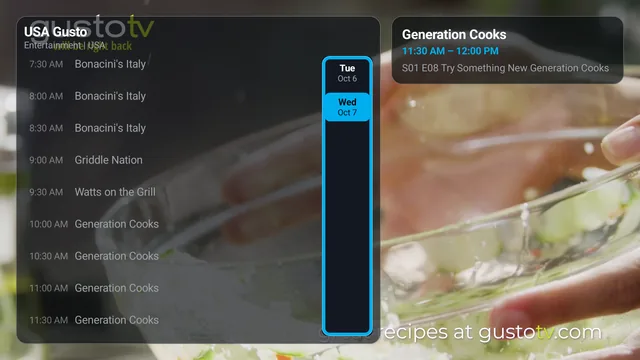
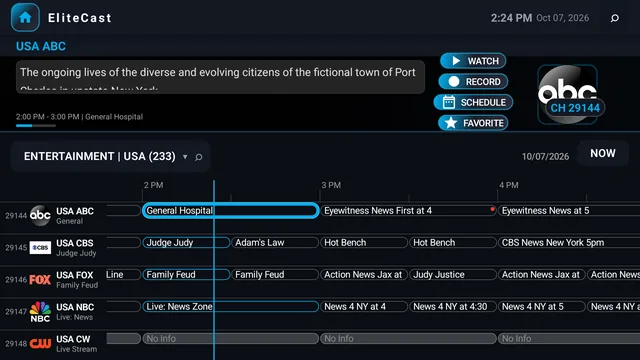
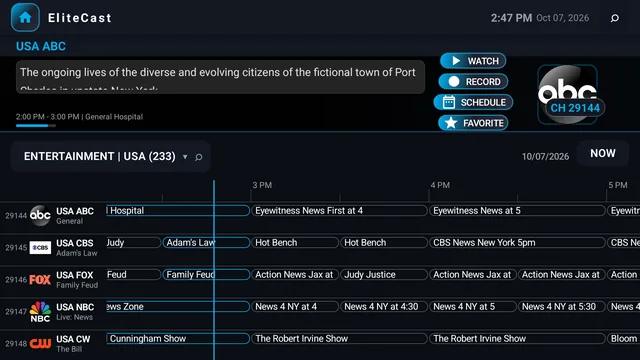
EliteCast, the timeline guide
Channels down the side, programs across a shared time axis and a now-line, with a live preview of the channel you are on. Pick any show to record it now or schedule it for later.
Blue accent, larger text · TV
07
Make it yours
Your accent color and text size are your choice. These screens use blue with larger text; pick any of ten colors, say blue on the TV and teal on your phone, set the text from small to extra large, and decide how much of the picture shows through the glass panels. Every change lands the moment you save.
Also on board
EliteView
Up to five live channels on one screen
Pick a two, three, four or five-way layout and give every panel its own channel. The sound follows the panel you move to while the others keep playing silently. The big game, the breaking story and the kids' cartoon, all at once.
Layouts for 2, 3, 4 or 5 channels
Sound follows the panel you are on
Change a panel's channel in two presses
Auto matches the panels to what your box can handle
Category Manager
Your line-up, cleaned up
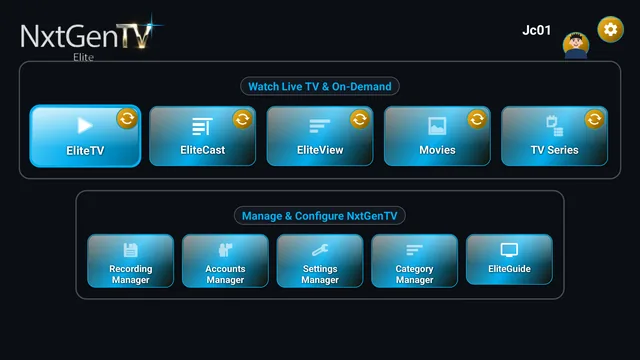
Providers send hundreds of categories. Category Manager lays them all out in one screen, a column each for EliteTV, EliteCast, EliteView, Movies and TV Series. Hide what you never watch and it is gone from every list and every search.
Hide a whole region with one switch
Choose the category each screen opens on
Hidden means hidden, search included
Kept separately for each provider account
Settings Manager
Every setting in one place, explained
Settings Manager puts the whole app in your hands, and every row tells you in plain words what it does. Tune playback, recordings, the guide, EliteView and the look of the app, then save once.
Live and film buffers, automatic or your own
Guide hours, row height and live preview
Accent color, text size and glass transparency
High-Efficiency Mode for lower-powered boxes
Bring your own sourceXtream, M3U URL, M3U file, or Stalker portal, plus XMLTV for M3U/Stalker
Built for the remoteD-pad navigation, visible focus, TV launcher entry with banner artwork
Room for the whole householdSave up to 10 provider accounts on a TV and switch between them
App Guide and EliteBotReference articles plus a helper that usually jumps to the right screen
Light or darkA light or dark look, remembered separately for your TV and your phone
The screenshots show NxtGenTv Elite running with a live TV provider account the developer uses. Channel names, logos and posters on screen belong to their owners and appear only to show the app working. NxtGenTv Elite does not include, supply or sell any channels, films or series. You add your own provider.
Flagship · Available now
Phone
Live TV player
Bring your own playlist. Watch it beautifully.
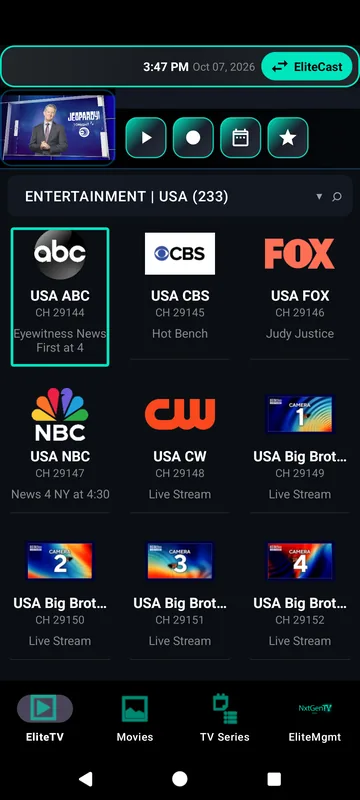
The same NxtGenTv Elite, in your hand. Watch live TV, films and series with the same glass menus as the big screen, record and schedule right on your phone, and download films and episodes to watch offline wherever you are.
One app for TV, box and phone. Bought on Google Play, it works on every device signed in to your Google account. Website purchases, coming soon, cover up to 5 devices.
Content-neutral by design. NxtGenTv Elite does not include, host or provide any channels, streams or content. You bring a source you are authorized to use.
Your channels in a grid with what is on now, and every category a tap away with its channel count. Long-press the picture for the glass quick menu, or swipe in from the left to browse channels while you keep watching.
02
Downloads for the road
Download films and episodes to your phone and watch them offline on a plane, a train, or anywhere you cannot reach your provider.
Recording Manager in Teal · Phone
03
Record and schedule on your phone
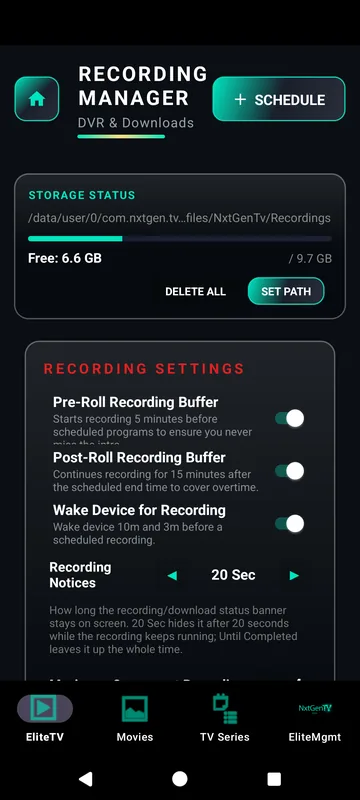
Start a recording with one tap and let EliteScheduler record a whole series or the same slot every week. The Recording Manager shows your free space and lets you start recordings a few minutes early, keep them running late, and wake the device before one begins.
Films and series · Phone
04
Films and series in your pocket
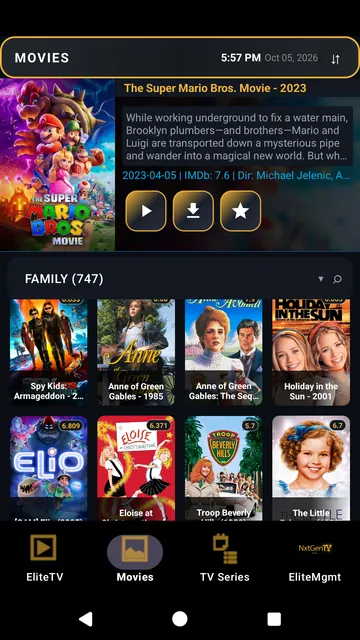
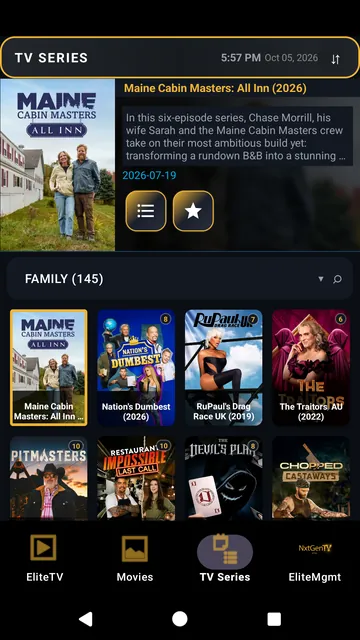
Poster grids with the details up top, and the next episode ready to roll when one ends.
The EliteMgmt menu in Teal and in Gold · Phone
05
Make it yours
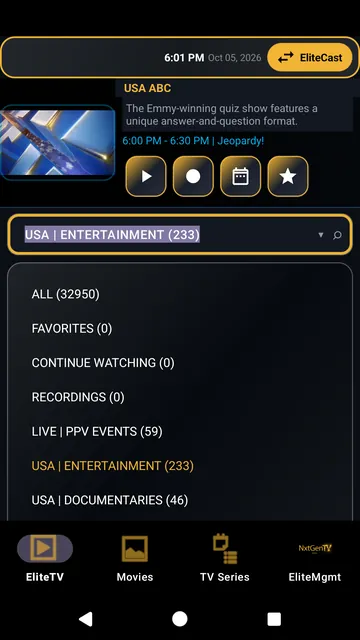
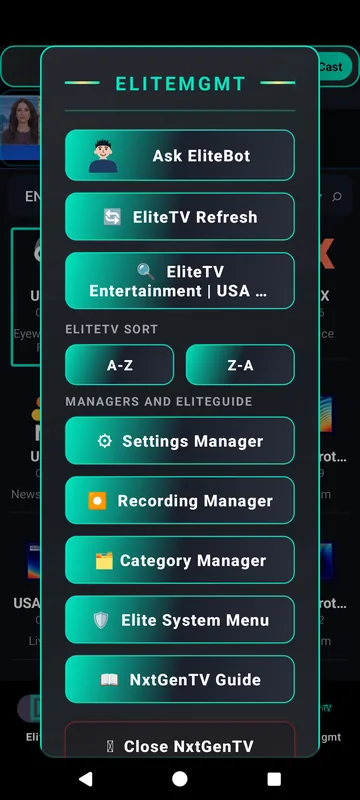
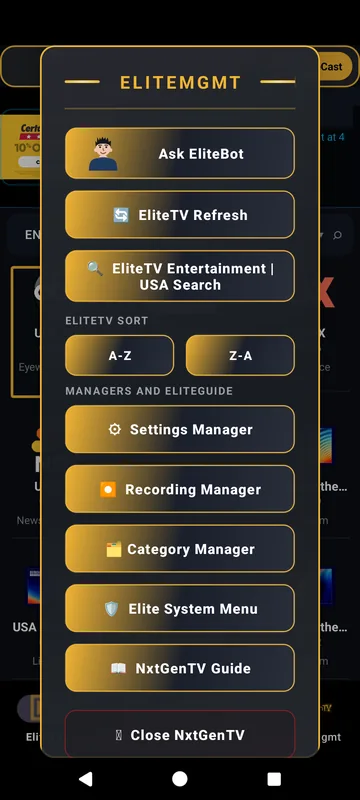
Your accent color and text size are your choice: here is the same glass menu in teal and in gold. Pick any of ten colors, say blue on the TV and teal on your phone, set the text from small to extra large, and choose see-through panels and a light or dark look. It all applies the moment you save.
Category manager · Phone
06
Only the channels you want
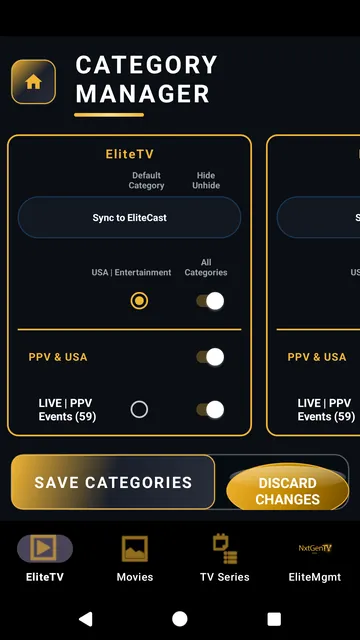
Give each screen its own default category and hide the ones you never watch, so every list opens exactly where you want it.
Also on board
EliteCast timeline guideChannels down the side, programs across a shared time axis, now-line
Settings ManagerEvery setting in one place, each one explained in plain words
Bring your own sourceXtream, M3U URL, M3U file, or Stalker portal, plus XMLTV for M3U/Stalker
App Guide and EliteBotReference articles plus a helper that usually jumps to the right screen
The screenshots show NxtGenTv Elite running with a live TV provider account the developer uses. Channel names, logos and posters on screen belong to their owners and appear only to show the app working. NxtGenTv Elite does not include, supply or sell any channels, films or series. You add your own provider.
Coming soon
EliteAtlas is not available yet. It will be sold separately, as an add-on for NxtGenTv Elite.
EliteAtlas
TV guide add-on
A fuller guide, up to two weeks ahead.
EliteAtlas takes your NxtGenTv Elite program guide further. It matches your channels to a catalog of guide sources and adds listings wherever your provider's guide has none, extends your guide up to 14 days ahead, and marks new episodes so they stand out from reruns.
Add-on for NxtGenTv Elite
Sold separately
BeforeWith EliteAtlas
01
Know what is on, on every channel
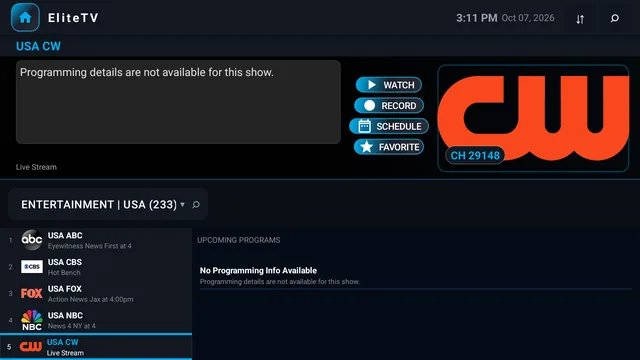
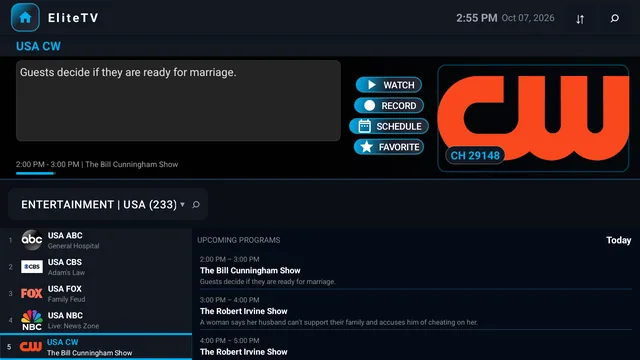
Channels your provider leaves without listings get them from EliteAtlas, so EliteTV can tell you what is on now and what comes next.
BeforeWith EliteAtlas
02
A timeline guide with fewer blanks
Your provider's listings always come first. EliteAtlas adds programs only where they have none, and carries your EliteCast guide on past their horizon, up to 14 days ahead.
Illustration
03
New episodes stand out
A NEW badge on the EliteCast timeline guide and the EliteTV now-and-next strip tells a new episode apart from a rerun at a glance.
Also planned
Set up in secondsOn first run it suggests guide regions from your channel names and your device's settings, and you confirm the list
Your call, channel by channelIt works automatically, and any channel can switch to EliteAtlas listings from its options menu
Regions around the worldGuide sources for the US and Canada, the UK and Europe, international and diaspora channels, and premium and sports
More than one guide of your ownAdd several guide addresses of your own, not just one
The before and after screenshots show a test build of EliteAtlas inside NxtGenTv Elite, running with a live TV provider account the developer uses. Channel names and logos on screen belong to their owners and appear only to show the app working. Neither app includes, supplies or sells any channels or content.
In development
RADS is being built now. It is not available yet.
RADS
Free-tier AI framework
Serious software, without a serious AI budget.
The agentic AI tools that build real software can cost more than many people can pay. RADS exists so you can build complex, useful applications anyway, using the free tiers of AI chat services and a small model running on your own computer.
RADS is an advanced orchestration framework under active development by Agentic Applications. Specifically engineered to maximize the operational capacity of free-tier AI sessions, it enforces a strict Research, Architect, Develop, and Self-Learn lifecycle to reliably execute complex software development tasks.
Illustration
01
The right worker for every job
An orchestrator on your own machine runs the whole loop in code, not in chat. It saves the free chat session for the creative work, hands planning, review and learning to a small model on your own computer, and gives builds and tests to plain tools that need no AI at all. Your free session goes further, and no paid plan is needed.
Illustration
02
A strict lifecycle, with proof at every step
Every task runs Research, Architect, Develop and Self-Learn, with planning, build, test and review in between. Each phase has to leave proof that it really ran before the next one starts, and when something it needs is not there, the run stops instead of faking a result.
Illustration
03
Many free sessions, one finished task
Free tiers run out. RADS plans for it: the task's state, plan, test results and proof live on your machine, not in the chat, so when one session hits its limit the next one restores where things stand and carries on.
Illustration
04
It gets smarter with every project
Self-Learn pulls the patterns out of each run into a local memory that later phases search, instead of rereading whole files and burning tokens. When a project wraps up, its lessons go back to one central RADS install that every project links to, so the next build starts out knowing more.
Under the hood
Works with the chat you useThe creative steps are vendor-neutral, so any capable chat assistant can take them on
Grounded, not guessedGrounding and verification gates check the work before a phase can pass
Kind to your computerIt watches graphics and system memory and pauses heavy work rather than crash the machine you are working on
Runs on your own PCWindows with an NVIDIA graphics card, RTX 30 series or newer recommended
In development
Pocket Naighbors is being built now, and its look is being completely redone. The pictures below are concept art for the new look.
Pocket NaighborsPocket NAIghbors
Carry your community wherever you go!
Android life-simulation game
Pocket Naighbors puts a living neighborhood in your pocket. Its people keep their own schedules, work jobs, earn and spend money, and walk between home, the market and the park, whether you are watching or not. Talk to them, ask them for things, and see how they answer. It all plays fully offline, and optional AI conversation, using your own provider key and off until you turn it on, gives every character more to say.
Concept art for the new look · in development
01
A neighborhood worth getting lost in
The Studio, the market and the park, reimagined with warm light, real texture and a world that feels lived in. Ask your neighbor to head across town, and watch them go.
Concept art for the new look · in development
02
Homes with a glow of their own
Light that follows the time of day, a lamp your neighbor can switch on, and a life you can talk to. Ask them something and they answer in their own words.
Concept art for the new look · in development
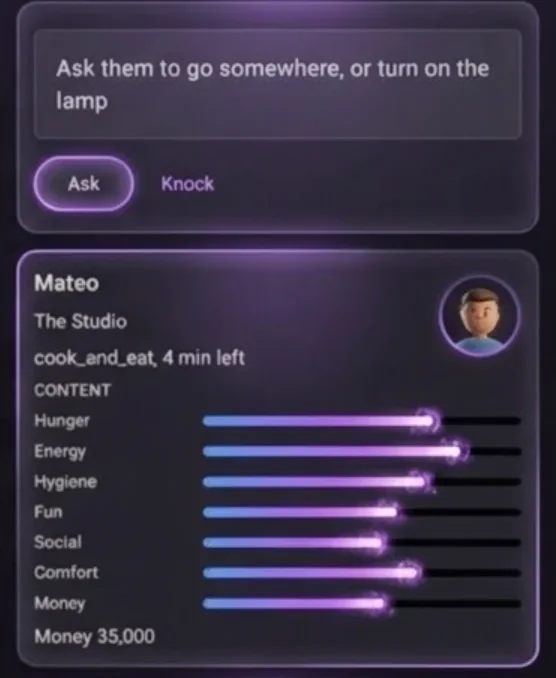
03
Every neighbor at a glance
Glass cards show where each neighbor is, what they are doing and how they feel, from hunger to fun to money. Ask them to go somewhere or turn on the lamp, or knock first. They may say no.
Also in the game
Life goes on without youCome back to a summary of how long the neighborhood ran while you were away
Real time, if you want itLet the game follow the real clock and your local weather, or keep its own time
Offline firstThe whole simulation runs on your device, and AI is an optional extra, never a requirement
In development
Cut Card is being built now. It is not available yet.
Cut Card
Pipefitting calculator
Know the cut before the torch comes out.
Cut Card gives pipefitters, pipe welders and steamfitters the number they actually cut. Enter the center-to-center and it takes off both fitting takeouts and the root gap at each weld, then rounds the answer to a mark you can make with soapstone. The working stays on screen, so you can check every step before you cut.
Android phones
Works with no signal
Illustration · example numbers, not to scale
01
The cut, not just the math
Center-to-center minus both takeouts, minus the root gap per weld, rounded to a mark you can make. Every takeout and gap stays on the card, so a wrong number gets caught on the screen, not on the pipe.
Also planned
Check backwardsEnter a cut you measured or already made and see the center-to-center it gives, before the torch comes out
Offsets solvedSimple and rolling offsets, and travel, run and set at the standard fitting angles, with the formula shown
A tape that never forgetsEvery solve is kept, so you can star a line or bring it back with a tap
A cut list for the foremanSend the job's cut list as plain text, with a diameter-inch total
A weld log that clones the last jointOne button repeats the last weld and bumps the number, and it warns before a process's continuity lapses
Built for gloves and basementsBig tiles, no signal needed, and it reopens exactly where you left it
02About
Big vision. Exacting craft.
Agentic Applications is a software company built on one conviction: great software should feel a generation ahead. We began in the living room with NxtGenTv Elite, and our pipeline now reaches into AI-assisted development and simulation games, every project held to the same exacting standard.
Built for every screen
A remote across the room and a phone in your hand ask different things of an app. NxtGenTv Elite runs on both, with D-pad navigation and visible focus wherever a remote is in play.
Intelligence on your terms
Smart where it counts, optional where it should be. EliteBot helps you reach the right screen in NxtGenTv Elite, and in Pocket Naighbors AI stays off until you switch it on with your own provider key.
Clear about what we make
Our software says plainly what it does. NxtGenTv Elite plays the sources you bring and includes no channels or content of its own.
03Contact
Let’s connect.
Questions about NxtGenTv Elite, curious about what is coming next, or have an idea worth routing our way? Send us an email.